
If you recently bought a new LED TV, you’ll want to make sure you’re getting the most out of your purchase. After all, it’s a big investment, and you want to reap the maximum possible rewards from it.
If you’re not satisfied with your TV’s display quality and want to enhance it, you can upgrade it with relative ease. Here are nine easy steps to do just that:
1. Choose the right preset: First thing first, to get the best picture quality on your smart TV, choose the best preset. All the best Smart TV in India come with several presets, like Standard, Game, Movie, Vivid offering different combinations of settings, so you can select the right mode accordingly.
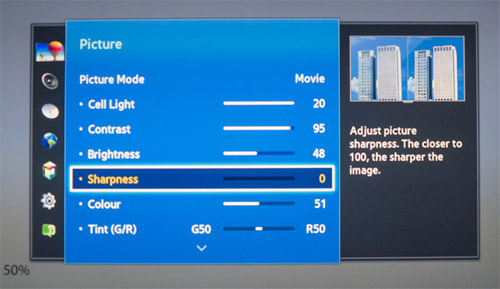
2. Adjust the Brightness: Adjust the screen brightness according to the lighting conditions of your room, to help improve the picture quality.
3. Increase Contrast: Increased contrast makes the picture pop by making the dark areas darker and the light areas lighter.
4. Calibrate Color and Tint: You can also adjust the color temperature, which is commonly known as the color tone. All the best Smart TVs in India have this function to help offer better colour reproductions in every condition.
5. Adjust Sharpness and Black Levels: A sharpness feature offers edge enhancement by adding a thin outline to a picture, making it more visible. You can also turn on any feature that enhances black levels of the display.
6. Enable Noise Reduction: If your Smart TV has a noise reduction feature, you may have to turn it on to get the perfect viewing experience while watching older standard-definition videos.
7. Disable Power Saving Mode: The power-saving mode optimizes the display for more energy-efficient operation by decreasing the image quality. Make sure it’s turned off.
8. Check for Slow Internet Speed: If you want to enjoy your favorite multimedia content on streaming platforms like Netflix, Amazon Prime and Hotstar, make sure you have high-speed internet, at least 40Mbps, to avail of the best picture quality.
 EMI Shop